All Document Reader & Editor
- 3.2
- Rating
- 10.00K
- Installs
- Free
- Price
 Analysis by App-foxy
I approached All Document Reader & Editor as a practical tools app rather than a replacement for a full desktop office suite. Its promise is straightforward: bring document reading and office editing into one mobile workspace. That makes sense for people who regularly receive files on a phone, need to check them quickly, or want to make a small correction without moving to a computer.
My overall impression is cautious but positive. The app is free, available to users rated Everyone, and comes from Bangladeshi Software Ltd. Its current release is version 1.0.7, and it supports devices running Android 8.0 or later. Those details make it accessible to a broad range of Android users, although accessibility alone does not tell me whether it is the right choice for sensitive work or demanding editing.
The app has an average rating of 3.2 from around thirty ratings, with roughly seven written reviews, and it has passed the ten-thousand-install mark. That is a modest footprint, so I would treat it as a developing utility rather than a deeply established document platform. I would test it with ordinary files first, then decide whether it deserves a place in a more important workflow.
You May Also Like

 AccuWeather: Weather Radar
AccuWeather Review: A Quick, Clear Forecast for Everyday Decisions
For everyday plans, the best forecast is the one you can understand quickly. AccuWeather makes rain timing, radar, and local conditions easy to act on, with a few trade-offs.

 Hill Climb Racing
Why Hill Climb Racing Still Turns Crashes Into One More Run
A tiny car, a bumpy hill and one more upgrade: Hill Climb Racing keeps resurfacing because its simple chaos makes every near-miss feel personal.

 AliExpress - Shopping App
AliExpress Makes Global Shopping Feel Personal, but Shoppers Bear the Risk
AliExpress turns a global marketplace into a pocket-sized discovery engine. Its reach is useful, its shopping loop compelling, and its trade-offs easy to miss.

 Lords Mobile: Kingdom Wars
Lords Mobile Is a Kingdom-Building Routine, Not a Quick Match
A case-by-case verdict on the building, battles, device demands, and social commitments that make Lords Mobile rewarding for some players and exhausting for others.

 PDF Scanner app - TapScanner
TapScanner Makes Paperwork Easier to Capture, Check, and Share
TapScanner makes scanning with a phone feel less like a rescue operation and more like a dependable step in getting work done. Its capture tools are useful, though not flawless.

 Block Blast!
 Shows How Much a Puzzle Game Can Leave Out
A quiet grid game shows why puzzle players increasingly value instant clarity, repeatable skill and low-pressure play—and where the genre still needs to catch up.
More From Our News Desk
View All News


How the document workspace feels in everyday use
I find the everyday appeal of this workspace less about editing everything on a phone and more about making a sensible first decision when a document arrives: read it here, make a small change, or leave it for a larger screen. In the next section, I’ll look at how that convenience holds up when several files or more demanding tasks enter the picture.
A useful starting point for mixed file habits
The strongest idea here is consolidation. Instead of keeping one reader for viewing documents and another editor for occasional changes, I can use one app as a first stop when a file arrives. That is particularly convenient when my needs are simple: open a document, read a few pages, check a table, adjust wording, and move on.
This kind of tool is most valuable when the phone is being used as a temporary workstation. Imagine receiving a meeting document while travelling. I may not need to rebuild the file or apply elaborate formatting. I might only need to confirm a paragraph, correct a name, or review a page before replying. A combined reader and editor can reduce the number of steps in that situation.
There is also a practical advantage for people who deal with files from different sources. Documents may arrive through messaging apps, email, cloud storage, or local folders. A general-purpose document tool can become the place where I try to open an unfamiliar office file before deciding what to do with it. That is a more realistic benefit than expecting a phone app to replace every feature of a desktop suite.
Where convenience stops being enough
Reading and editing are not equal tasks. A reader can be useful with a wide range of files, while editing depends heavily on formatting, embedded objects, fonts, tables, images, comments, and compatibility. A document that looks fine on a phone may change when opened elsewhere, especially after a small edit.
For that reason, I would use this app for light revisions rather than final production work. A short letter, a basic office note, or a quick correction is a sensible test. A complex report with carefully positioned images, detailed tables, or strict page layout deserves a second check in the software that will ultimately be used to print or submit it.
The important trade-off is convenience versus confidence. Having a single mobile tool is convenient, but convenience should not be mistaken for perfect file fidelity. If the document matters professionally, I would keep the original untouched, edit a copy, and reopen the result in the intended destination app.
Three workflows that make more sense than casual browsing
My first recommended workflow is the “review before forwarding” routine. I would open the file, check the title, names, dates, and visible formatting, then make only the necessary correction. After saving, I would compare the edited copy with the original instead of assuming that a successful save means every element remained unchanged.
The second is a “phone as an inspection desk” workflow. If I receive several documents during the day, I can use the app to decide which ones actually need a computer. This saves time because reading a file and editing a file are separate decisions. The phone is often good enough for sorting, checking, and making a minor change, even when it is not the best place for a final layout review.
The third is a “clean copy” workflow for shared devices or temporary tasks. I would work from a duplicate, avoid leaving unnecessary drafts in accessible folders, and remove the copy when the task is finished if it is no longer needed. That is not a special feature claim; it is a sensible habit whenever a document tool is used for personal or work material.
Trust starts with what I can actually verify
Because documents can contain private information, I pay attention to more than the editing screen. I want to know what permissions the app requests, whether an account is required, what choices are visible before a file is opened, and how clearly the app explains any handling of content. Those are the points where trust becomes practical rather than theoretical.
For this app, I would inspect the permission prompts and privacy information directly on the device before importing anything sensitive. I would not grant access automatically just because the app needs to open a file. If Android presents a choice between limited access and broader file access, I would choose the narrowest option that still lets me complete the task.
I would also look for visible account controls. If the app can be used without signing in, that may be preferable for a one-off document check. If an account is requested, I would first understand why it is needed and what controls are available for managing it. A document editor should make those choices understandable instead of turning them into an unnoticed step.
Permissions and data-sensitive moments
The most sensitive moment is not necessarily installation. It is the instant a document is selected, opened, modified, or saved. A file may contain an address, an identity document, financial details, private correspondence, or internal business information. Before opening such material, I would confirm that I am using the correct file and that the device itself is protected.
I would be especially careful with files received from unknown senders. A document reader is still handling an external file, so I would avoid opening unexpected attachments merely to see what they contain. When possible, I would verify the sender through another channel first and use a disposable copy for inspection.
Another useful check is the save destination. After editing, I would look at where the new file went rather than assuming it replaced the original. This matters because duplicate copies can be overlooked, and a sensitive document may remain in more places than expected. A quick folder review after the task is more valuable than relying on memory.
I would also avoid treating a free price as a privacy guarantee. Free access is convenient, but it does not by itself explain permissions, storage, account requirements, or data practices. My recommendation is to judge those areas through the choices and explanations visible in the app and its Android settings, not through the price label.
How much control should a user expect?
For an app like this, user agency means being able to choose files deliberately, understand when access is requested, decide whether to sign in, and control what remains on the device. I would look for clear prompts rather than silent importing, and I would prefer a workflow where opening one file does not require exposing an entire document collection.
Android’s permission manager is part of that control. After installation, I would review the app’s permissions, revoke anything unnecessary, and reopen the app to see whether the basic reading workflow still works. If a permission is genuinely required, the app should explain the reason at the moment it asks. If the explanation is vague, I would keep the app away from confidential files.
I would also keep notifications and sharing in mind. A document can become exposed through a preview, a recent-files screen, or an accidental share action even when the original file is stored safely. I would check the phone’s notification settings and be deliberate when using the system share menu. These small choices are easy to overlook and often matter more than a polished editor interface.
Who will get the most value from it?
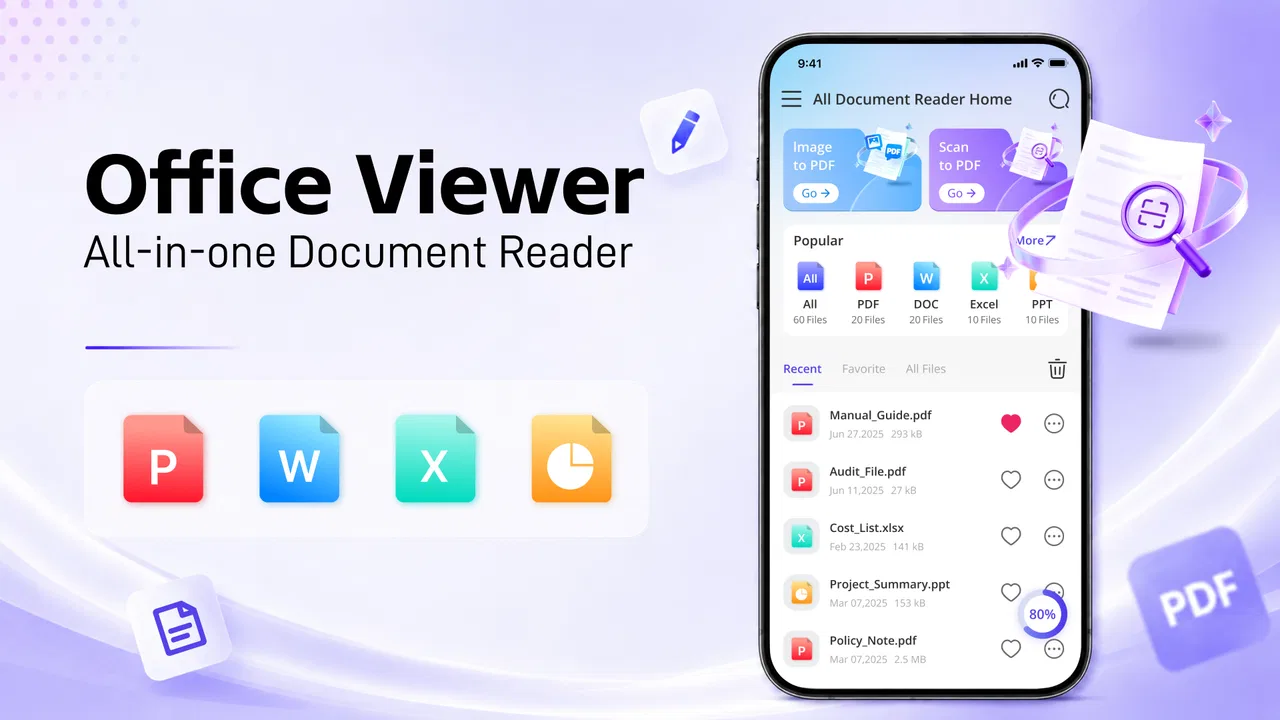
I see the best fit as a student, traveller, occasional office worker, or home user who needs a straightforward document reader with light editing available. It is also suitable for someone who dislikes installing several separate utilities for basic document tasks. The free price lowers the barrier to trying it, and the Everyone rating makes it approachable for general household use.
It may also help users with older Android phones, since Android 8.0 support includes devices that are no longer running the newest operating systems. Still, older hardware can vary greatly in speed and storage, so I would judge the experience on the actual phone rather than assuming that compatibility guarantees smooth performance.
I would skip it as a primary tool if my work depends on advanced collaboration, strict formatting preservation, extensive revision history, or highly sensitive documents. In those cases, a dedicated office platform with clearly documented account, sharing, and privacy controls may be a better fit. A specialised reader may also be preferable if I only need viewing and want to keep editing tools out of the workflow.
How it compares with the usual alternatives
The usual alternatives fall into three groups: dedicated document readers, full office suites, and file managers with preview support. A dedicated reader is often the simpler option for people who never edit. It can keep the task focused and may feel less cluttered. The trade-off is that I need another app whenever a correction is necessary.
A full office suite generally makes more sense for serious editing, especially when documents contain complex layouts or need to move between desktop and mobile environments. Such suites can be heavier and may bring account or subscription decisions into the experience. All Document Reader & Editor is more appealing when I value a compact, free starting point over a complete professional workspace.
A file manager with previews is enough for quick inspection when the operating system already handles the required format. It is not a true substitute for an editor, though. The advantage of this app is the possibility of moving from reading to a small edit in one place. The disadvantage is that I must still verify the result when formatting or compatibility matters.
Questions I would settle before relying on it
Would I use it for a confidential document immediately? No. I would first review permissions, visible privacy explanations, account requirements, and save behaviour. I would begin with a non-sensitive sample, check the resulting file, and only then consider a more important document.
Would I use it to replace a desktop office suite? Not for demanding work. I would use it as a mobile companion for reading and modest corrections. If a document has a strict layout or will be submitted, printed, or shared widely, I would complete a final inspection in the software used by the recipient.
Is an account automatically necessary? I would check the app’s opening flow and account controls rather than assume either way. If an account appears optional, I would avoid creating one for a temporary task. If it is required, I would read the available controls before importing personal files.
Can I trust the app simply because it has a reasonable number of installs? The install count and rating provide context, not a privacy verdict. A modest rating average suggests that experiences may vary, so I would pay attention to how the app behaves on my device and whether its prompts are clear.
Is it worth trying? Yes, if I need a free, general-purpose Android tool for opening documents and making occasional edits. I would keep expectations realistic, use copies of important files, and treat permissions and data choices as part of the evaluation rather than an afterthought.
My cautious recommendation
All Document Reader & Editor has a sensible role: it can turn an Android phone into a convenient place for document checking and light office work. I like the idea of combining reading and editing, and the free access makes experimentation easy. The current version, 1.0.7, shows that the app is being maintained as a usable product, while the 3.2 average rating tells me to approach it with measured expectations rather than automatic confidence.
My advice is to start with ordinary, non-private files. Review Android permissions, observe whether the app asks for an account, note where files are saved, and check the edited copy in another viewer when the document matters. Those steps give me more control without adding much effort.
In the end, I would recommend it to casual and occasional users who want one free document utility on an Android phone. I would not make it my unquestioned home for confidential records or complex office production. Use it as a convenient first-stop workspace, not as a substitute for careful file handling. That balance is where this app makes the most sense.
FAQs for All Document Reader & Editor
01What is All Document Reader & Editor, and which file formats does it support?
All Document Reader & Editor is a mobile productivity app designed to open, view, and sometimes manage common office and document files from one place. Depending on the version and device, it may support formats such as PDF, DOC, DOCX, XLS, XLSX, PPT, PPTX, TXT, and image-based documents. Before downloading, check the store listing because supported formats and editing capabilities can vary between Android and iOS versions.
02Can I edit documents with All Document Reader & Editor, or is it mainly a viewing app?
The app is presented as more than a simple document viewer, offering editing tools for selected file types. However, the available functions may differ by format. Basic actions can include adding text, making annotations, highlighting content, or modifying document details, while advanced word-processing or spreadsheet features may be limited. Users who need professional editing should verify the exact tools included in the current release.
03Does All Document Reader & Editor work offline?
All Document Reader & Editor can generally be useful offline once documents are stored on your phone or tablet, which is convenient for reading files while traveling or without mobile data. Internet access may still be required for downloading files, synchronizing cloud storage, displaying advertisements, activating premium features, or using online conversion tools. Offline behavior can depend on the document type and the app version.
04Is All Document Reader & Editor free to download and use?
The application may be available as a free download, but free access does not necessarily mean every feature is included without restrictions. Some versions can contain advertisements, optional in-app purchases, subscriptions, or limits on editing, conversion, cloud services, and file management. Review the pricing information shown in the Google Play Store or Apple App Store before installing, especially if you need advanced tools.
05Is All Document Reader & Editor safe for private and confidential files?
As with any document-management application, users should consider privacy before opening sensitive files such as financial records, identification documents, or work materials. Review the app’s permissions, privacy policy, developer information, and whether files are processed locally or uploaded to a server. Avoid granting unnecessary access, keep the app updated, and use extra caution when using online conversion or cloud-related features.
Pros
- Opens PDF
- DOCX
- XLSX
- PPTX
- TXT
- and other common formats.
- Search
- zoom
- and page navigation make long documents easier to handle.
- Supports offline access after files are saved on the device.
- Built-in file manager helps organize documents in one place.
- Useful for quickly reviewing attachments without switching apps.
Cons
- Advanced editing tools may require a premium subscription.
- Complex layouts can display differently from the original file.
- Large documents may take longer to load on older phones.
- Ads can interrupt the experience in the free version.
- Some file formats may have limited editing or formatting support.

All Document Reader & Editor
Gallery